


 EN
EN
 ID
ID

 Contact Us
 Location
 E-Form
 Whistleblower Service
 Anti-Fraud Education







D-Bank PRO #SelaluMenggoda


 Quick Access


 IDR
IDR
IDR
IDR
 USD
USD
 EUR
EUR
 IDR
IDR
IDR
IDR
 USD
EUR
USD
EUR


| Simulation Results | |
|---|---|
| Investment Goals | Future Investment |
| Komparasi Jenis Aset Konvensional : | Time Deposit |
| Komparasi Jenis Aset Investasi : | Small Mid Cap Equity Funds |
| Nominal Investasi Awal | 0,00 |
| Nominal Investasi Bulanan | 0,00 |
| Time Deposit | Small Mid Cap Equity Funds |
|---|---|
|
Total Savings + Return
71.228.531,00
|
Total Savings + Return
78.729.940,72
|
|
Total Savings
70.000.000,00
|
Total Savings
70.000.000,00
|
|
Total Return
1.228.531,00
|
Total Return
8.729.940,72
|
|
Nilai Pertumbuhan %
1,76%
|
Nilai Pertumbuhan %
12,47%
|
|
Jangka Waktu Investasi
20 Tahunan
|
Jangka Waktu Investasi
20 Tahunan
|
| Simulation | |
|---|---|
| Property Prices | 0,00 |
| Down Payment | 0,00 |
| Investment Period | 1 Year |
| Annual Interest Rate (%) | 0% |
| Loan Amount | 0,00 |
| Monthly Installment | 0,00 |
| Simulation Results: | |
|---|---|
| Your Loan Amount | 0,00 |
| Loan Period | 1 Month |
| Monthly Interest Rate (%) | 0% |
| Total Monthly Installment | 0,00 |
| Simulation Table | |
|---|---|
| Type of Loan | Simple Working Capital |
| Type of Business | Service |
| Monthly Sales | 0 |
| Total Loans from Other Banks | 0 |
| Kebutuhan Modal Kerja | 0 |
| Total limit yang dapat diberikan | 0 |
| Simulation Table | |
|---|---|
| Type of Loan | Complete Working Capital |
| Average monthly sales | 0 |
| Cost of goods sold | 0 |
| Siklus Modal Kerja | 0 |
| Piutang | 0 |
| Inventori | 0 |
| Hutang Dagang | 0 |
| Kebutuhan Modal Kerja | 0 |

To make it easier for you to pay Danamon American Express® Credit Card or Charge Card bill, we provide several payment options.

| Payment via Bank | Channel | Fee |
|---|---|---|
|
Danamon |
Autopay/Autodebet |
Free |
Use your Bank Danamon ATM card, select the Danamon American Express® Credit Card or Charge Card payment menu, then enter your Danamon Card number and the desired payment amount. Make sure the card number entered is correct, and the payment will be immediately recorded for the specified amount.
Payments made after 18:00 WIB will be processed on the next business day.
| Payment via Bank | Channel | Fee |
|---|---|---|
|
Danamon |
Danamon ATMs |
Free |
Danamon American Express® Credit Card or Charge Card payments through the D-Bank PRO application can be made via the Payment menu. Download the D-Bank PRO application from the Play Store or App Store.
| Payment via Bank | Channel | Fee | Payment Cut-off Time |
|---|---|---|---|
|
Danamon |
D-Bank PRO Application |
No Fee |
20:00 WIB. If the payment is made after 20:00 WIB, it |
Use cash payment to pay for your American Express® Danamon Credit Card or Charge Card via Bank Danamon branch. Ensure the information of your card and name is correct on the deposit slip. Cash payments require a processing time of 1 (one) working day.
| Payment via Bank | Channel | Fee |
|---|---|---|
|
Danamon |
Teller |
IDR 75,000 |
You can make your Danamon American Express® Credit Card or Charge Card payment through other Banks in Indonesia that have partnered with Bank Danamon.
|
Bank |
Payment Channel* |
Processing Time** |
Fee |
|---|---|---|---|
|
BCA |
ATM, Klik BCA, M-BCA |
3 (three) working days |
Rp7.500 |
|
Maybank |
ATM |
3 (three) working days |
Rp5.000 |
|
BNI |
ATM |
3 (three) working days |
Rp7.500 |
*Bank Danamon payment code with the transfer menu is 011.
*Payment fees via other banks are in accordance with the provisions applicable to each bank.
For further information, please contact Hello Danamon at 1-500-090.
For information on how to pay the Danamon Credit Card, click here


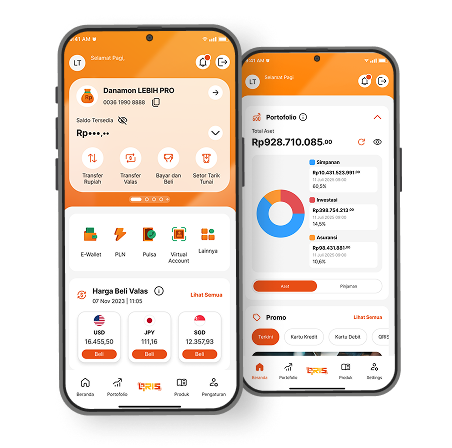
From transaction to daily financial management, find the right solution that captivates everyone from D-Bank PRO by Danamon!
Download Now
